del.icio.us
http://del.icio.us/
Digg / News
http://www.digg.com/
Clipmarks - Bite-size highlights of the web.
http://www.clipmarks.com/
HEMiDEMi - 共享書籤
http://www.hemidemi.com/
2007年1月18日 星期四

圖片產生器
RedKid.Net
http://www.redkid.net/generator/soup/sign.php
Custom Sign Generator Page, Over 5,000 Parody Image Generators (Personalized Flash Ecards & JPG Pictures) To Play With, Ajax Web 2.0 Applications
http://www.customsigngenerator.com/
ImageChef
http://www.imagechef.com/ic/product.jsp
http://www.redkid.net/generator/soup/sign.php
Custom Sign Generator Page, Over 5,000 Parody Image Generators (Personalized Flash Ecards & JPG Pictures) To Play With, Ajax Web 2.0 Applications
http://www.customsigngenerator.com/
ImageChef
http://www.imagechef.com/ic/product.jsp
2007年1月15日 星期一
換成新版的Blogger
研究了好久,終於發現換成新版的Blogger原來很簡單。
中文版的Blogger沒有顯示轉換新Blogger的功能,所以在設定檔裡將語系設成英文,英文版的Blogger控制頁中就有轉換的功能,改完之後,再設回中文語系即可。
轉換過程需要一點時間,而且中文有一點點問題,原來的自己設定的中文連結變亂碼,不過POST的文章都還是正常。
中文版的Blogger沒有顯示轉換新Blogger的功能,所以在設定檔裡將語系設成英文,英文版的Blogger控制頁中就有轉換的功能,改完之後,再設回中文語系即可。
轉換過程需要一點時間,而且中文有一點點問題,原來的自己設定的中文連結變亂碼,不過POST的文章都還是正常。
2007年1月14日 星期日
用CSS為link加上icon
Showing Hyperlink Cues with CSS (Ask the CSS Guy)
http://www.askthecssguy.com/2006/12/showing_hyperlink_cues_with_cs_1.html
Attach icons to anything with CSS
http://www.hunlock.com/blogs/Attach_icons_to_anything_with_CSS
以下是CSS語法:
a[href $=\'.pdf\'] {
padding-right: 18px;
background: transparent url(icon_pdf.gif) no-repeat center right;
}
a[href ^=\"mailto:\"] {
padding-right: 20px;
background: transparent url(icon_mail.gif) no-repeat center right;
}
a[class =\"popup\"] {
padding-right: 18px;
background: transparent url(icon_popup.gif) no-repeat center right;
}
a[class ~=\"popup\"] {
padding-right: 18px;
background: transparent url(icon_popup.gif) no-repeat center right;
}
http://www.askthecssguy.com/2006/12/showing_hyperlink_cues_with_cs_1.html
Attach icons to anything with CSS
http://www.hunlock.com/blogs/Attach_icons_to_anything_with_CSS
以下是CSS語法:
a[href $=\'.pdf\'] {
padding-right: 18px;
background: transparent url(icon_pdf.gif) no-repeat center right;
}
a[href ^=\"mailto:\"] {
padding-right: 20px;
background: transparent url(icon_mail.gif) no-repeat center right;
}
a[class =\"popup\"] {
padding-right: 18px;
background: transparent url(icon_popup.gif) no-repeat center right;
}
a[class ~=\"popup\"] {
padding-right: 18px;
background: transparent url(icon_popup.gif) no-repeat center right;
}
HTML Tag
HTML and CSS Tutorials, References, and Articles | HTML Dog
http://www.htmldog.com/
無聊人的無聊小站 - 完全W3C手冊(HTMLDOG中文版)
http://www.chweng.idv.tw/w3cguide/
HTML Tag分類表
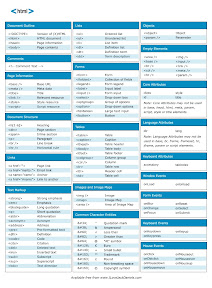
http://www.htmldog.com/
無聊人的無聊小站 - 完全W3C手冊(HTMLDOG中文版)
http://www.chweng.idv.tw/w3cguide/
HTML Tag分類表
Why windows takes so long to start up
IntelliAdmin.com: Why windows takes so long to start up.
http://www.intelliadmin.com/blog/2006/09/why-windows-takes-so-long-to-start-up.html
人總是希望電腦越快越好,尤其是自己用的,上面詳述記載著一些方法。
此機碼有4個可能的值,如下:
0 - Disabled : The prefetch system is turned off.
1 - Application : The prefetch only caches applications.
2 - Boot : The prefetch only caches boot system files.
3 - All : The prefetch caches boot, and application files.
http://www.intelliadmin.com/blog/2006/09/why-windows-takes-so-long-to-start-up.html
人總是希望電腦越快越好,尤其是自己用的,上面詳述記載著一些方法。
- The prefetch cache
- Hard drive fragmentation
- Disconnected network drives
- Spyware & Adware
- Disable File and Printer Sharing if you do not use
此機碼有4個可能的值,如下:
0 - Disabled : The prefetch system is turned off.
1 - Application : The prefetch only caches applications.
2 - Boot : The prefetch only caches boot system files.
3 - All : The prefetch caches boot, and application files.
Turn Google into Napster 2000
Tech Tonic » Turn Google into Napster 2000
http://tech-tonic.net/technology-trends/turn-google-into-napster.html
文章裡說明了如何利用Google搜尋特殊的檔案,比如說
搜尋mp3, wma
-inurl:(htm|html|php) intitle:”index of” +”last modified” +”parent directory” +description +size +(wma|mp3) “檔名”
搜尋doc, pdf
-inurl:(htm|html|php) intitle:”index of” +”last modified” +”parent directory” +description +size +(pdf|doc) “檔名″
搜尋mpg, wmv
-inurl:(htm|html|php) intitle:”index of” +”last modified” +”parent directory” +description +size +(mpg|wmv) “檔名”
http://tech-tonic.net/technology-trends/turn-google-into-napster.html
文章裡說明了如何利用Google搜尋特殊的檔案,比如說
搜尋mp3, wma
-inurl:(htm|html|php) intitle:”index of” +”last modified” +”parent directory” +description +size +(wma|mp3) “檔名”
搜尋doc, pdf
-inurl:(htm|html|php) intitle:”index of” +”last modified” +”parent directory” +description +size +(pdf|doc) “檔名″
搜尋mpg, wmv
-inurl:(htm|html|php) intitle:”index of” +”last modified” +”parent directory” +description +size +(mpg|wmv) “檔名”
訂閱:
文章 (Atom)